Bills, set aside first
Add rent, loans, insurance and subscriptions once. They stay out of your daily number, and MoneyBook reminds you on the day.
A reminder arrives on the day each bill is due.
A bill is logged only when you mark it paid, on the date you paid.
Tick Paid automatically and it's logged on its day.
What counts as a fixed bill
Anything that costs the same each time: rent, a loan, insurance, a subscription. Bills that change every month, like electricity, are better added as normal expenses. Fixed bills are set aside first, so your daily limit is worked out from what's left and paying them never eats into your daily spending. Rent paid a few times a year is set aside evenly every month.
Bills to confirm
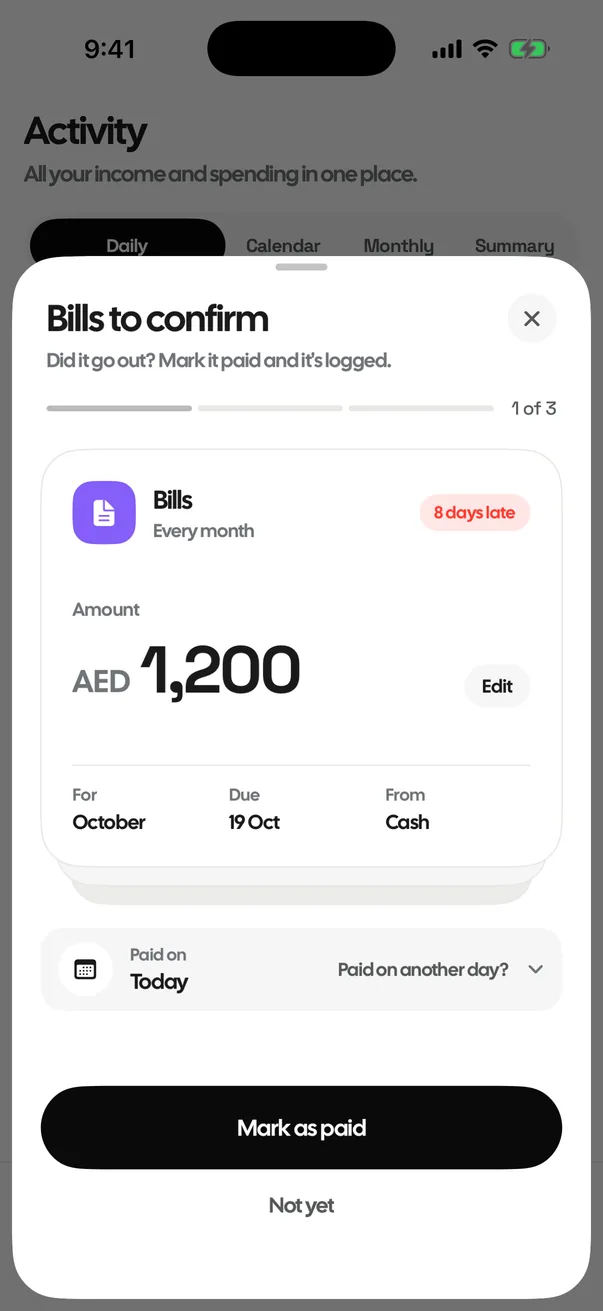
On a bill's day you get a reminder. Tap it, or open the app on a day a bill is due or overdue, and the Bills to confirm sheet opens. Tap Mark as paid for each one, change the amount if it was different, or pick another day if you paid earlier. Not yet leaves it unpaid and reminds you again the next morning.
Where every bill stands
In Fixed bills each bill shows its status: Paid for the month, Due on a day still to come, Due today, or Overdue since the day it was due and not yet marked paid.
Paid it already? Logged it yourself?
When you add a bill you can tick Paid for this month and choose the day you paid, so you're not asked again until next month. And if you log a bill as a normal expense, with the same amount in the bill's category or the bill's name in the note, MoneyBook recognises it as that bill's payment. It isn't asked about again and doesn't count against your daily limit a second time.
Changes apply from next month
Edit a bill and the change applies from next month by default, so a payment already logged stays as it was. Tick Update this month's payment too to change it as well. Deleting a bill stops future reminders; past payments stay in your history.
Bills on your Home Screen
The Bills coming up widget shows your next bills, and what's late or due today, without opening the app.
Questions
Does MoneyBook log my bills for me?
No. On a bill's day you get a reminder and MoneyBook asks you to mark it paid. It is logged only when you do, on the date you paid. Bills marked Paid automatically (direct debit) are the exception.
What time do bill reminders arrive?
At 9 AM on the bill's day. If nothing arrives, check that notifications are allowed for MoneyBook in your iPhone's Settings.

Track every expense in two taps.
FreeNo accountNo adsData stays on your iPhone